
Getting started
How to Play
From clicking the link to fighting your friends. It only takes about a minute!
Your first match
Open the game, pick a fighter with the arrows on the title screen, and hit Start. That is it. You land in the waiting room, it fills up, and a short count-in drops everyone into the arena together. On your own, you might join a match that is already going instead: see Joining a match in progress.
Rooms fill fast. If there are not enough people around, CPU fighters start taking the empty slots after about seven seconds, so you are never waiting long.
Each round lasts five minutes. Be the last one standing and you win it. If the clock runs out with people still up, whoever has the most health left takes it. Rounds keep coming for as long as the room stays together, and each one can earn you Rank XP: the higher you finish, the more you get.
Begin your climb of the leaderboard!
Controls
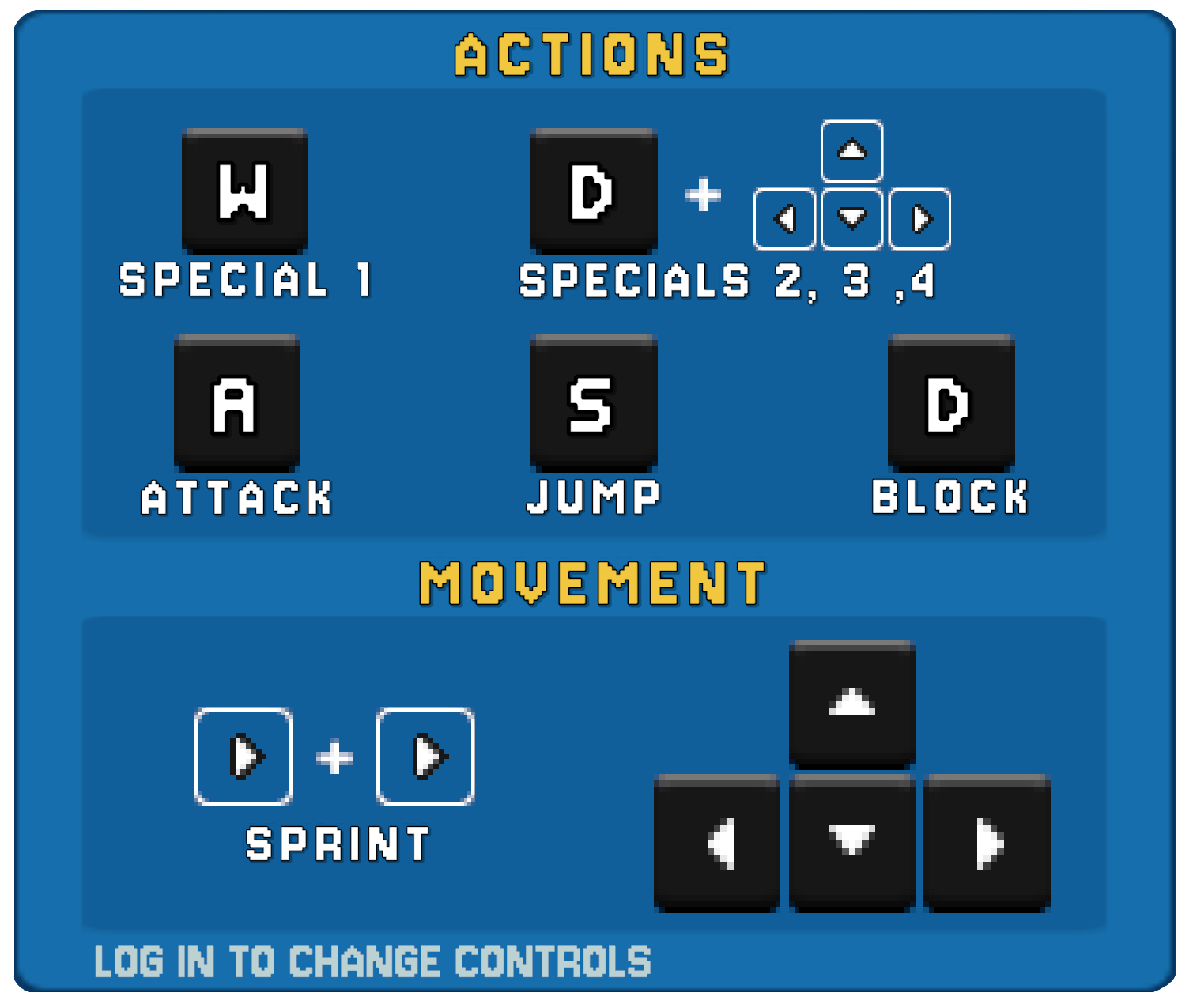
Play on a keyboard or a controller. The controls shown in the game follow whichever you used last, so pick up an Xbox or PlayStation controller and they switch to match it.
| Keyboard | Xbox | PlayStation | |
|---|---|---|---|
| MoveUp and down move you into and out of the screen | ← ↑ ↓ → |  or left stick |  or left stick |
| Sprint | Tap a direction twice, or Left Shift + a direction | Tap a direction twice, or click the left stick | |
| AttackKeep tapping to run the chain | A |  |  |
| Jump | S or Space |  |  |
| BlockA tap: the guard lasts 0.8 s, and each blocked hit keeps it up | D |  |  |
| Dodge | D while sprinting | while sprinting | while sprinting |
| Special 1 | W |  |  |
| Special 2 | D + ← or → | + ← or → | + ← or → |
| Special 3 | D + ↓ | + ↓ | + ↓ |
| Special 4 | D + ↑ | + ↑ | + ↑ |
A few combinations are worth knowing from day one:
- Sprint, then attack: a heavier sprint attack. Most of them launch.
- Sprint, then block: a dodge. A quick slide that gets you out of the way.
- Sprint, then jump: a fast jump that covers real distance.
- In the air, attack: an air attack. Every fighter has one.
- Sprint, then jump, then in the air, attack: a heavy air attack.
Changing your controls
You can rebind your controls from the title screen: every action on the keyboard, and the face buttons, bumpers and triggers on a controller (the stick and d-pad always move you). Space still jumps, and Left Shift and a left-stick click still sprint, whatever you change. You need to be logged in to do it, and your bindings are saved to your account, so they follow you to any browser you log in on. Guests play with the default controls.
Guest or account?
You can play the whole game as a guest. No sign-up, no email. Hit Start and go. Guests can party up with friends and earn unlocks, and the game remembers you on that browser, so your progress is there when you come back to it. Clear your browser data and it is gone.
An account adds the things that need to follow you around:
- Your unlocks and Rank XP on any device
- A place on the leaderboard
- A permanent friend list, not just tonight's party
- Custom key bindings
- Your own display name, up to 16 characters
Log in from the title screen. You can switch at any time.
Playing with friends
Everyone has a 9-digit friend code. Open the Friends panel from the title screen to find yours and to add someone else's.
What happens next depends on who is logged in:
- If the person you add is playing as a guest, you are put in a party together straight away. Just send and play, easy!
- If you are both logged in, they get a friend request. Once they accept, you are on each other's lists for good.
A party enters matches together. The party leader picks the battle preferences for everyone, hits Start, and the whole party lands in the same room. Your partymates show a marker on the top UI panel so you can find each other in the chaos.
Getting requests you do not want?
Decline someone and, if they send you another request while you are still playing, a Blockbutton appears on it in the Friends panel, so you can keep playing in peace. Your friend code never changes, so share it wherever you like.
Battle preferences
Open Battle Preferences from the title screen. The game settings come first:
- Region. Auto picks the closest server. You can also choose one by hand and see its ping.
- Matchmaking. Free-For-All, Team or Random. Free-For-All is every fighter for themselves, Team is a Team Battle, and Random goes with whatever the rest of the room picked (a coin toss, if nobody picked). Your pick steers you towards a room that plays it, but each round's mode goes to the most votes among the room's party leaders (on your own, you are your own leader), and a mode that keeps losing still gets a round now and then. Team needs at least three fighters and isn't offered in 1v1.
- Allow CPU players. Checked, and computer fighters fill empty slots and replace anyone who leaves. Unchecked, and it is humans only: the room waits up to 30 seconds to fill, then starts as soon as there are at least two of you, so expect a slightly longer wait.
- Game Type (coming soon). Locked for now.
- Battle Size. Large (10 players), Medium (7), Small (4), 1v1, or Random. With CPUs on, a room you open fills to that number. With CPUs off, it is a cap. On your own, you may be put in a room of a different size if it already has people in it, but 1v1 always stays 1v1.
- Arena. Random, or the arena a room you open starts in. Join someone else's room and you get their arena.
- Rotate Arenas. Checked, and a room you open changes arena between rounds. Unchecked, and it stays put.
Then the sound settings:
- Music Volume and SFX Volume. A slider each.
- Sound Icon. Whether the sound icon on the title screen and in the arena turns off just the music, or the music and the sound effects.
- Music. Modern, Retro or Random.
- Victory Theme. The music when a round ends: Modern, Retro, or Default to follow your Music choice.
- Announcer. Any announcer you have unlocked, or Off.
In a party, the leader's game settings are the ones that count.
Team Battle
In a Team round the room splits into colour-coded teams. Picking Team in Matchmaking is your vote for one (see Battle preferences). Parties are kept together wherever possible, humans are placed first and CPUs fill the gaps. Your attacks don't hurt your own team, so go all out. The only exceptions are Freya's bombs and Kinto's Ultimate Powerball, which can catch their own side (Kinto's only if he is forced to drop it).
The last team with anyone standing wins the round, and your Rank XP follows your team's place. Knocked out? Stay and watch your team fight on. If the clock runs out, the team with the most fighters still standing wins, and if that is level, the team whose survivors have the most health left between them.
Practice arena
While a room is filling up, there is a PRACTICE ARENA button in the waiting room. Press it and you drop into a private arena with a training dummy while you wait. Every move, every special, no pressure.
When the real round is ready, the count-in pulls you straight in. If you are in a humans-only room with nobody else yet, practice runs for as long as you like. PressEsc or RETURN TO WAITING ROOM to go back.
Joining a match in progress
On your own, you may be put into a match that is already going instead of a fresh room, as long as another person is playing in it. You land in the waiting room and fight from the next round, as the fighter you picked on the title screen.
Until then, SPECTATE lets you watch the round being fought, and RETURN TO WAITING ROOM (or Esc) brings you back. PRACTICE ARENA is open too, until just before your first round. When it starts, it pulls you in from wherever you are.
Leaving a match
The leave button on the arena's top panel takes you back to the title screen. It asks Leave Match? first, so a stray click won't cost you the round. It isn't there in the practice arena, which has its own way out, or while you are spectating before your first round, when RETURN TO WAITING ROOM is your way out instead.
But be warned, leaving a round mid-match will count as a loss. This will affect your standing on our leaderboards!